I build AI systems to help founders and enterprises acquire and support their users. Currently supporting 4M+ active app users. Back to code in my 50s after 12 years in management.
Behind the Scenes of Building a Grocery Management System for Portfolio✨
|
Hello Reader, I'm leading a software development team to build a grocery management system in just six weeks. The goal is to provide every team member with real-world software development experience they can share during their job interviews and secure a high-paying job. In this email, I'll take you through our journey of developing a grocery management system. I'll cover how we got started, chose our project, decided on the tech stack, and progressed so far. What we've accomplished so far✨
1. Chosen our project and expand our project idea into a detailed set of features and work areas, 2. Designed the application flow. 3. Selected our technology stack, including programming languages, libraries, frameworks, and tools. 4. We have created a GitHub repository, project structure, and branching strategy. Ensured everyone set up the GitHub project on their machine and tested the merge workflow. 5. Designed our database modal, created tables, and populated it with sample data. 6. Create JIRA stories & tasks. Distributed weekly roles for JIRA, GitHub, project and DevOps management 7. Started coding. Let's dive into our journey - how we started and got to this point.Each challenge we overcame brought us closer as a team. Here's how our team started working on this project and made incredible progress in the first two weeks. Let's start by discussing our tech stack first. Please note that we picked our tech after brainstorming about our project and application flow.👇 1. How we picked our tech stack✨Deciding on our technology stack was a thoughtful process that spanned several days. First, we listed the programming languages and frameworks familiar to each team member to identify commonalities. Subsequently, we analyzed the job market in the respective local market (Dallas area) to identify which technologies were in high demand. After careful consideration and team discussions, we selected the following tech stack. Frontend
Backend
Database
AI Integration
Our collective expertise, market demand, and the specific needs of our project influenced this decision. Next, we needed coding, collaboration, and project management tools.👇 2. How we picked our tools✨We are using the following tools for effective collaboration. Google Docs - Our central hub for critical information and quick access to essential links. Visual Studio Code is our code editor. GitHub is our code repository, which has version control and collaborative coding. Vercel is our deployment environment with CI/CD. JIRA is our requirements, tasks and progress tracking tool. Figma is the creative space for our brainstorming sessions, designing user flows, flowcharts, entity-relationship diagrams, and visual mockups. Zoom is our conference call application. I have a Zoom pro account, so meeting time is not an issue. We also record our meetings so team members can watch them later if they miss one. Discord we are using DSD Discord, which has specific channels for each cohort team to communicate and collaborate with each other. We also have a voice channel for ad-hock team meetings and working sessions. Next, let's deep dive into our project selection process.👇 3. How we chose our project✨We started with four project ideas and settled on a grocery management system. We discussed each project in detail during the selection process and compared its benefits, complexity, interview appeal, etc. We had three stages of voting and much negotiation among team members. Example, Following is our initial problem statement. Grocery Management tool with built-in Recipe integration and macro counter. This tool will analyze the groceries you have on hand, can help build out a grocery list for things to get for meal prepping for the week and give a detailed list of macros such as protein, carbs, etc. If a user puts in the items they have in the fridge, it can generate a list of recipes based on those ingredients. Next, we expanded the initial project idea into smaller items and areas of work.👇 4. How we refined our idea✨We expanded the initial project idea into smaller items and areas of work. To do this, each team member created sticky notes based on their understanding of various items. I asked the team members: One more thing: I created a Figma file for us to brainstorm offline. Please spend some time today and put your thoughts in the following section. You can also do this in a notepad and share a photo of your writing and drawing. Look for two things - (1) List of functionalities - name or one-line description (2) Screen flow - How will users navigate our app? Think about the sequence from the login page to the home screen and beyond. For example, login page -> home page -> receipt page As a result, each team member brought so many ideas to our next meeting. Through this process, we combined, refined, rearranged, regrouped, and prioritized our ideas, laying a solid foundation for our project. This process of breaking a project into smaller groups of activities is called Work Breakdown Structure (WBS).
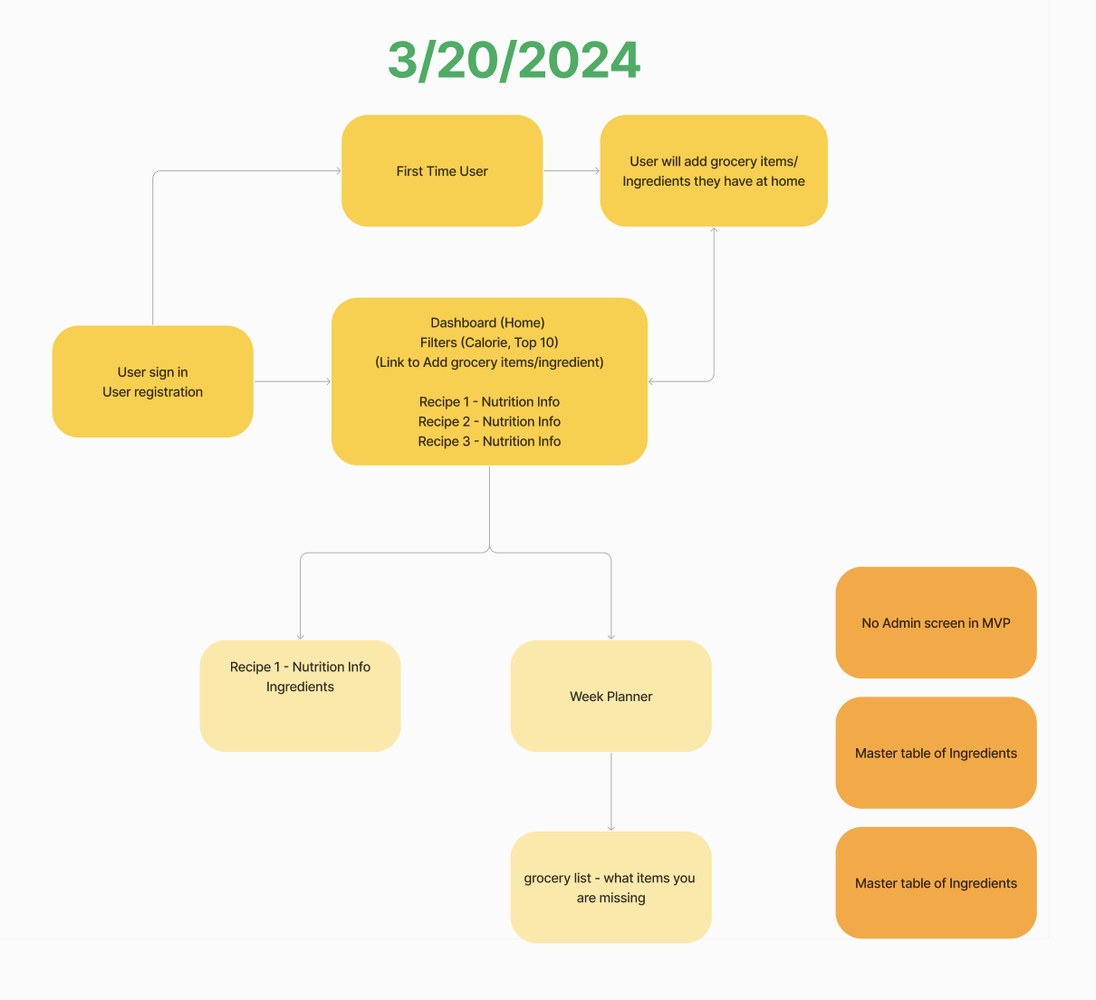
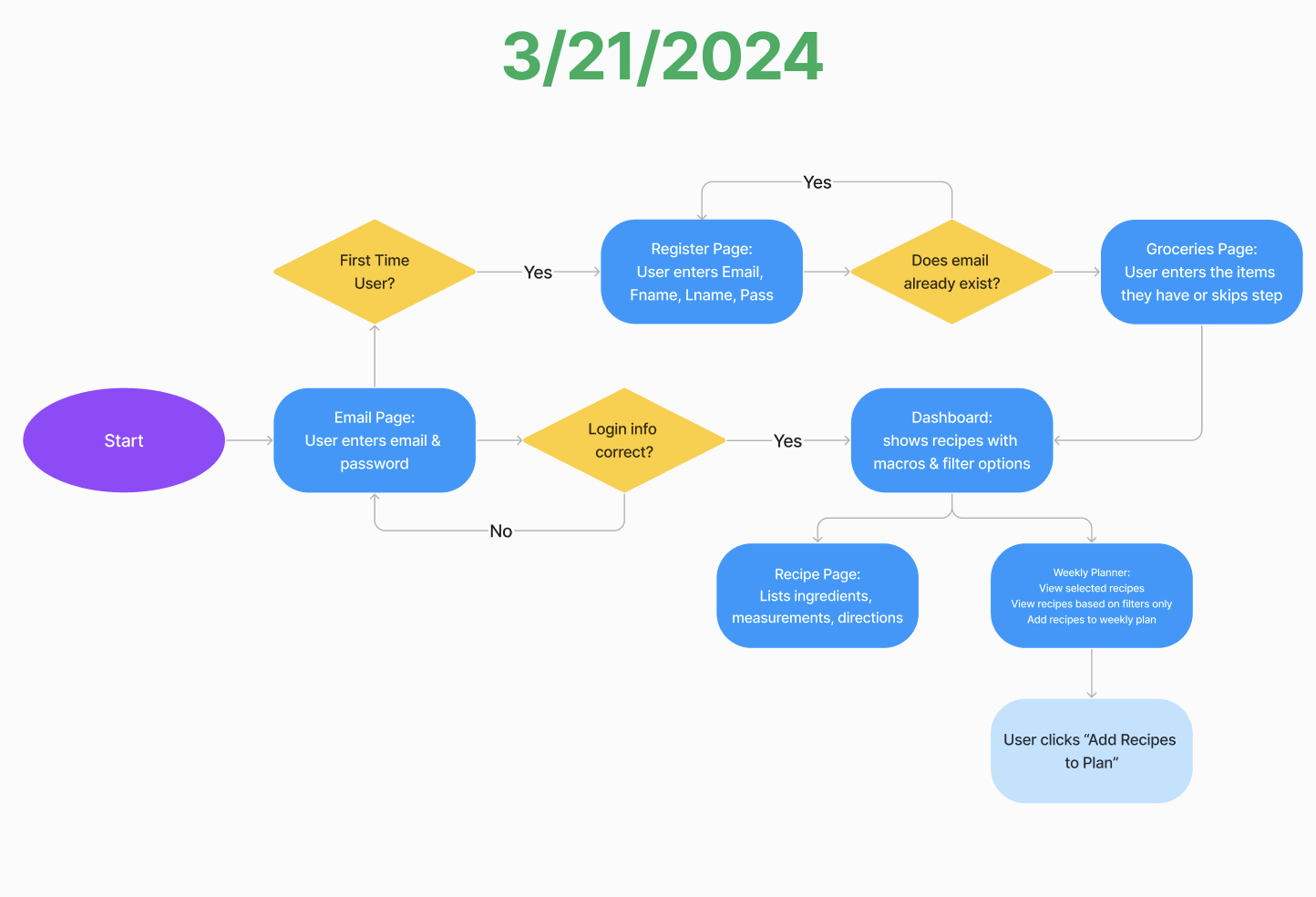
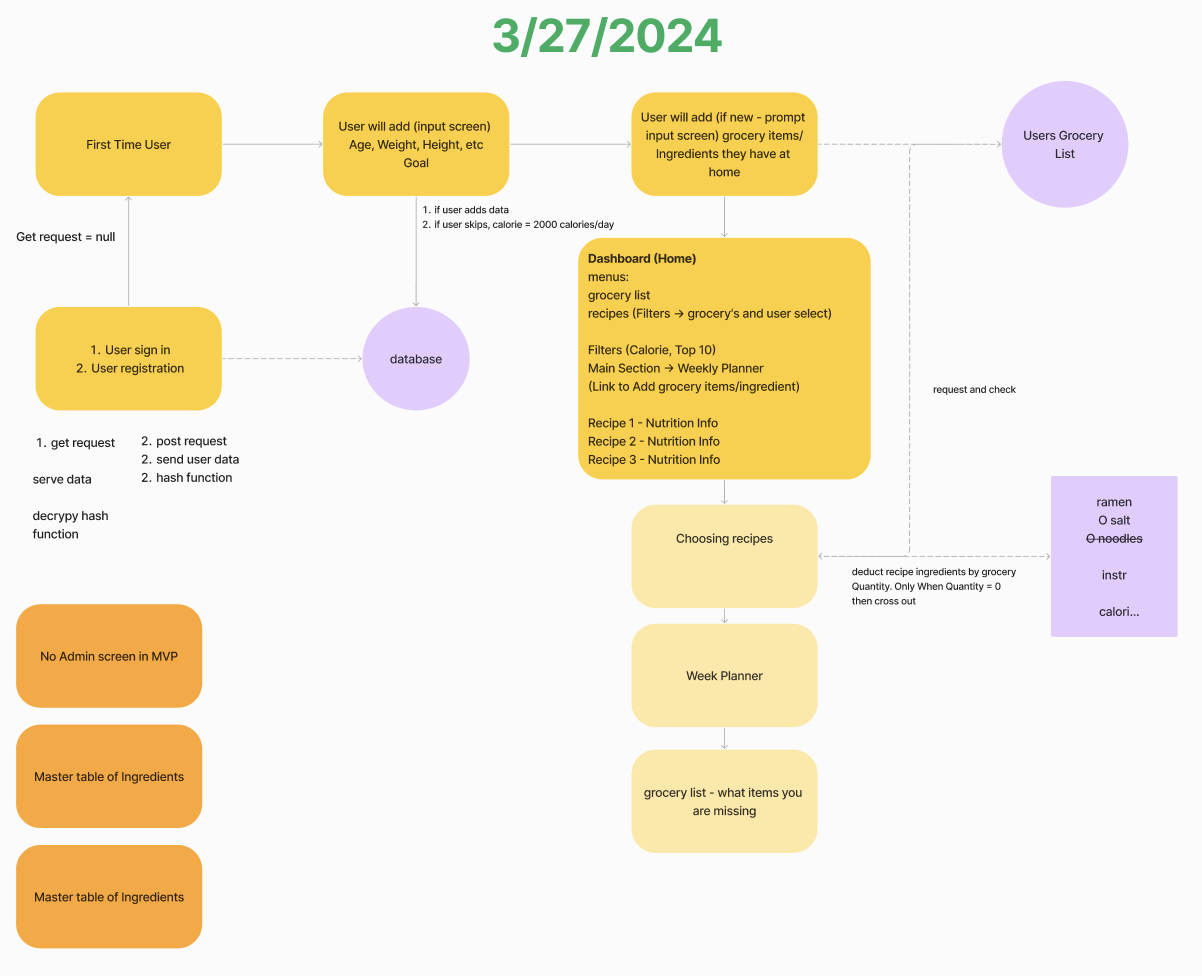
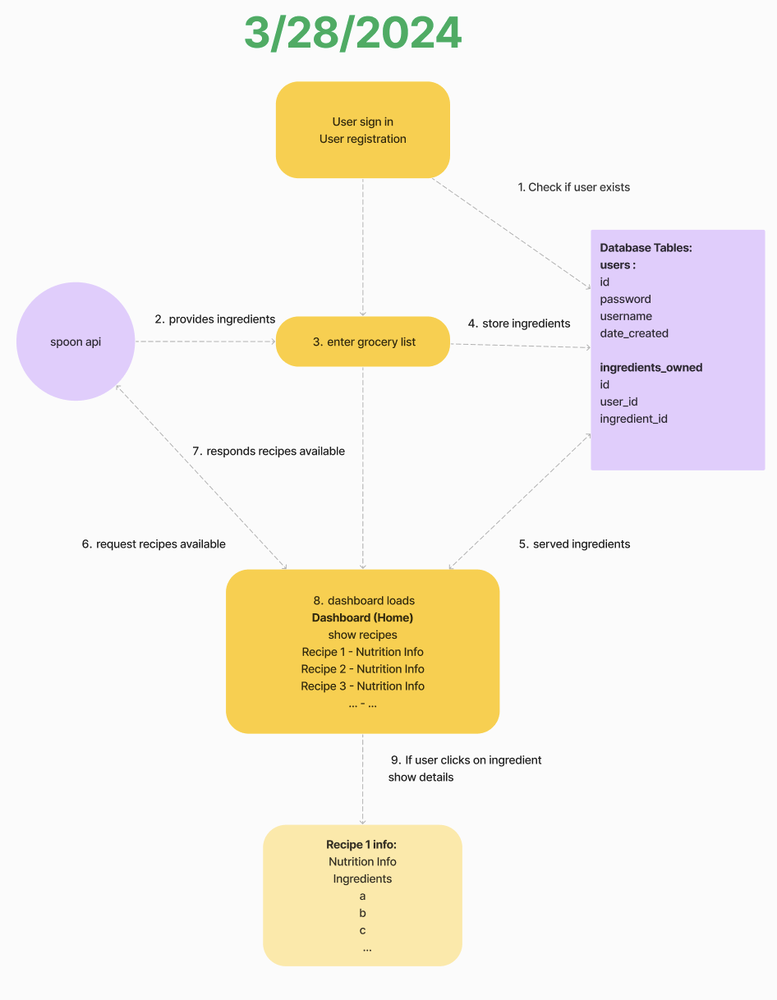
Next, we started designing the application flow👇 5. How we designed the application flow✨After breaking down our project into smaller items, we started putting things together by designing the application flow and mapping out the user journey within our app. We envisioned a user's steps: visiting the site, registering, logging in, navigating to the home screen, and exploring menu options. This step stretched our imagination, clarified our project's concept, and bridged the gap between our initial idea and its real-world usage. It's about seeing the project through the user's eyes and ensuring a seamless experience from start to finish. We went through many iterations during the last few days, and each iteration has refined our flow. V1 of application flow
V2 of application flow
V3 of application flow
V4 of application flow
V5 of application flow
Next, we created our database design and sample data.👇 6. How we build our database design✨Meanwhile, we worked together to create the database design. Instead of directly creating databases and tables, we concentrated on conceptualizing the database's model. This approach ensures that they're well thought out when we start creating our database and tables. Additionally, the team wrote scripts for populating our database with sample data, setting a solid foundation for testing and development. That's been quite the journey! In just two weeks, we've made incredible progress. Next, we created a GitHub project structure and branching strategy.👇 7. How we created the GitHub repository, project structure and branching strategy✨After deciding on our tech stack, we set up our project on GitHub, starting with a NextJs and Vercel template. This template provided a great starting point, and the team tailored it to fit our project's specific needs. We also established our branching strategy and policies for merge requests (MR) and pull requests (PR). Every MR/PR must receive two approvals before merging. Our branch flow is organized as Feature Branches (individual work) → dev (integrated development) → test (for more stable demos) → main (for production). Each team member configured their local environment to match the project setup and tested the merge workflow. Here's a snapshot of what our GitHub repository looks like now. Next, we distributed coding and non-coding work among team members.👇 8. Team roles, area of work and high-level activities✨To ensure this is a well-structured team, we picked roles every professional team has and divided them among our team members. We will switch these roles weekly so that everyone can experience various areas of work. Project roles:Frontend - Parvinder
Backend - David
Dev Ops - Abhiram
QA Testing - Parvinder
Other roles
Managing work:We use JIRA to manage our work, requirements, and tasks. Here's a snapshot of our JIRA.
That's a lot of. Right? Let's wrap up👇 What a ride! 🚀 In just two weeks, we've made incredible progress. As I wrap this post, I'm filled with gratitude for our progress and the lessons we've learned along the way. Each milestone we reached and the challenges we overcame brought us closer as a team and to our ultimate goals. I want to extend a heartfelt thank you to everyone who's been supporting our journey. |



Start Building Products Faster with AI Coding
I build AI systems to help founders and enterprises acquire and support their users. Currently supporting 4M+ active app users. Back to code in my 50s after 12 years in management.
Last week, I showed how to build a personal context folder for Claude Code from scratch. That approach is useful because you understand exactly how the system works. But not everyone wants to spend an hour deciding which files, folders, and instructions to create. So I packaged the starting point into a free Claude Code Context and Skills Kit. The setup is simple: Open an empty folder in VS Code. Copy one prompt. Run it with Claude Code. Claude will interview you about your: Background and...
Your AI forgets you every time you open a new chat Every new session starts the same way. You explain your stack. Your project. Your brand. What you decided last week. Then you switch tools and explain it again. The fix is not a better prompt or longer context memory. It is a folder that remembers, sitting on your machine, that every AI tool you use can read. I showed my own brain folder in the last post. It has been taking shape for months, and it runs everything I build. Several people...
Let me show you what actually happens when Virgil "just asks Nelly." Nelly is the AI brain behind Virgil's launches. I built her. Virgil talks to her in plain language over Telegram. For example, he'll ask Nelly to analyse the last three launch campaigns. "Hey, analyse these emails and tell me which one actually made the money." Simple, right? Looks like magic. It is not. It is plumbing. Here is what fires behind that one line. The brain is connected to Kit, so it can read every email that...